EnginOPCScanner Is Out: A Free OPC UA Scanner
EnginOPCScanner, a free Windows program that connects to OPC UA servers on PLCs and industrial devices and lists every variable with its NodeId, data type, access and live value, is now available for download.
The first step of any SCADA, HMI or MES integration is always the same: getting the full list of OPC UA variables on the PLC. Which variable lives at which NodeId, what is its data type, is it writable, what is its unit? I built EnginOPCScanner to answer these questions quickly, and it is now available for free.
→ Go to the EnginOPCScanner page and download
What it does
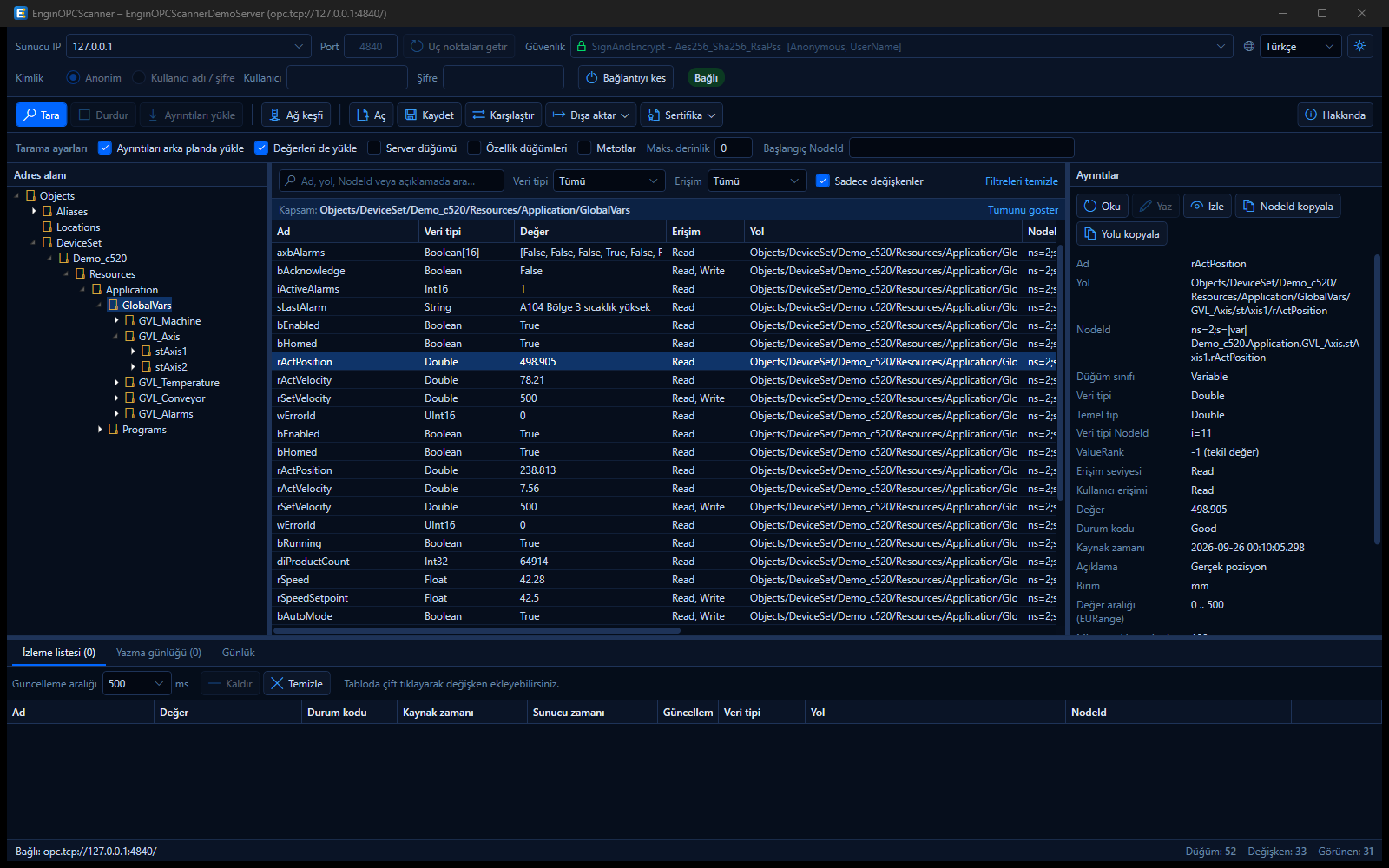
EnginOPCScanner connects to OPC UA servers on industrial devices over IP and lists every variable in the address space. The address space tree is on the left, the variable table in the middle and all details of the selected node on the right. For each variable you see:
- path and NodeId
- data type (with enum/struct distinction), ValueRank and array dimensions
- access levels and description
- EngineeringUnits and EURange
- value, status code and timestamp
Fast, even on large projects
Scanning is staged. Only the structure (tree, paths, NodeIds) is read first, which takes seconds even on large projects, so the table is usable right away. Details such as data type and access load in the background, with the open folder first. Clicking a variable reads its value and all attributes from the PLC instantly.
Highlights
- Live monitoring: Double-click a variable to add it to the watch list; values update in real time via subscription.
- Safe value writing: Values are validated against the data type, confirmation is required before sending and every write is logged.
- Network discovery: Finds OPC UA servers in an IP range such as
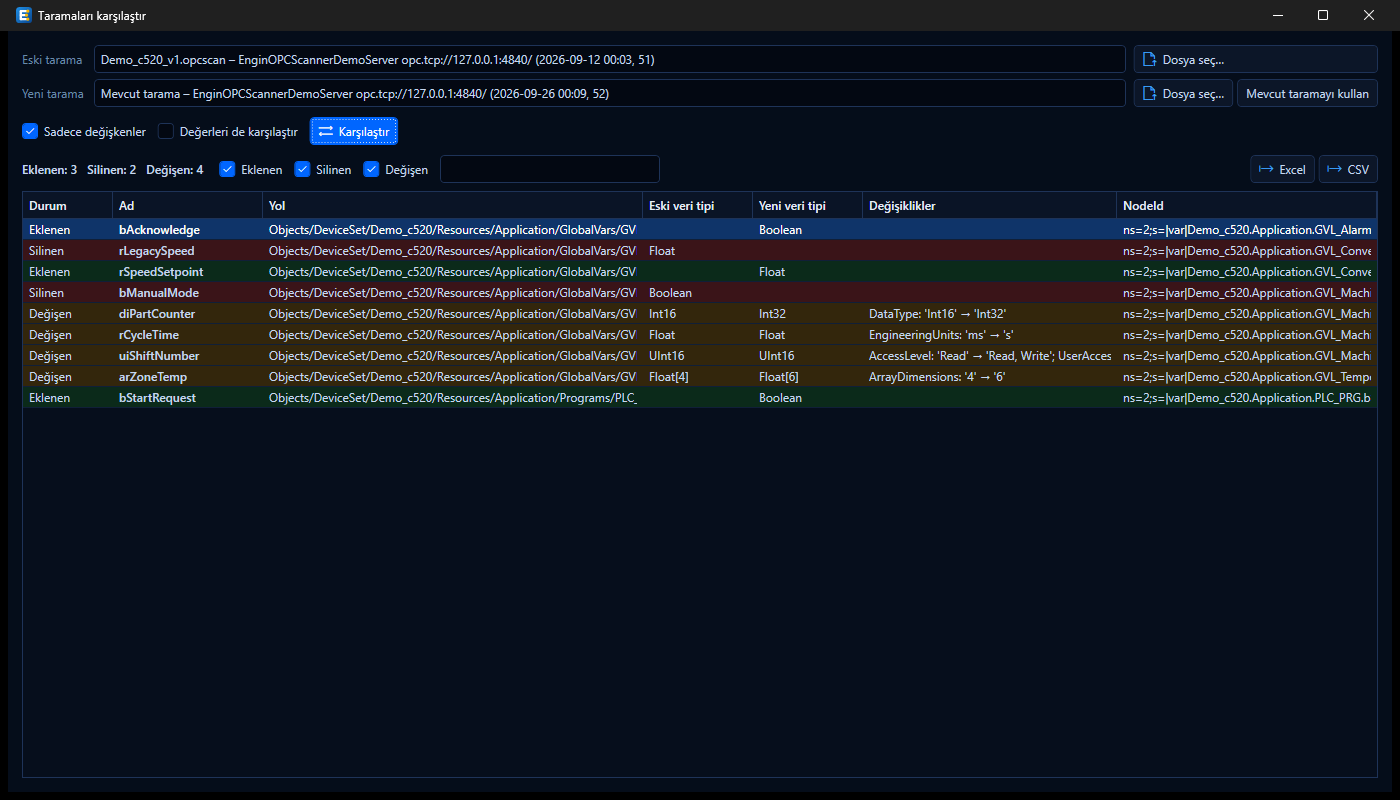
192.168.1.1-254or192.168.1.0/24. - Save and compare: Save scans as
.opcscanfiles and see added, removed and changed variables between two scans. Matching stays correct even if the namespace index changes. - Excel / CSV: Export the full list with one click.
- Secure connection: None, Sign and SignAndEncrypt modes; anonymous or username/password login.
Works with every brand
EnginOPCScanner is brand-independent. Because OPC UA is an open industrial standard, the program works with any device or software that runs an OPC UA server, whatever the manufacturer: PLCs, HMI and SCADA systems, industrial PCs and gateways. When connecting, keep two things in mind:
- No variables visible: On most PLCs, publishing variables over OPC UA has to be enabled separately in the PLC project. Make sure the OPC UA server and variable sharing (symbol configuration / OPC UA access settings) are enabled and the variables to share are selected.
BadSecurityChecksFailed: The server does not trust the client certificate. Save it via Certificate → Export client certificate and mark it as trusted in the device’s OPC UA security / certificate settings.
Try it without a PLC
If you have no PLC at hand, you can try the program with the separately downloadable DemoServer. It provides a PLC-like address space and the values in the Simulation folder change every second. You can also add variables to test large projects:
EnginOPCScanner.DemoServer.exe 4840 54000Download
EnginOPCScanner is free. It needs no installation or .NET; just extract the zip and run EnginOPCScanner.exe. It runs on Windows 10 and 11 (64-bit), and the interface is available in English and Turkish.
For bug reports or feature ideas, feel free to write to me via the contact page.